



 Equipment
To manage the equipment, there are a few major things which should be known. They are related to each other and at the end, there will be collated tours to see the usage for each asset (equipment, part or service) of it.
Collated Tours
These 4 fields in all assets influence the algorithm, how tours are collated:
| Field | Description |
|---|---|
|
Include in collated tours |
This is the major switch if tours are collated or not for this asset. There is also an action in the equipment view context menu to easily toggle this value and which was helpfull when debugging this feature. |
|
Collate ID |
This defines which equipment, parts or services belong together, this can be any text |
|
Date |
The collated assets are sorted by the "Date" field which starts or ends a collation |
|
Collate tours between "Previous" or "Next" |
Tours can be collated until the previous part/service or until the next part/service. Normally, a part is collated with the next part and a service is collated with the previous service, but this can be selected. When tours are collated with an equipment, then it is collated always with the next equipment. When parts or services have the same "Collate ID", all of them can be collated only to the previous or to the next, there can be no mix and match. |
Assets
|
Equipment An equipment can collate tours by its own or it can contain equipment parts and/or services which can collate tours, but both is not possible. It can be created in the view toolbar or context menu. |
|
|
Equipment Part This can be any part of an equipment which is collating tours. It can be created in the view context menu. |
|
|
Equipment Service An equipment service and equipment part are internally the same only the UI is differently. It can be created in the view context menu. |
|


Assign Tours
An equipment can be assigned to a tour within the context menu in all views, which are displaying tours.
An equipment part or service cannot be assigned to a tour, they are automatically "assigned" in the equipment view by "Collate ID" and "Date".

Equipment View
The equipment view can be opened in the app menu Directory.
It is used to manage all equipment, parts and services and to display all its collated tours. With different view column profiles, it can be switched very easily between the desired columns.
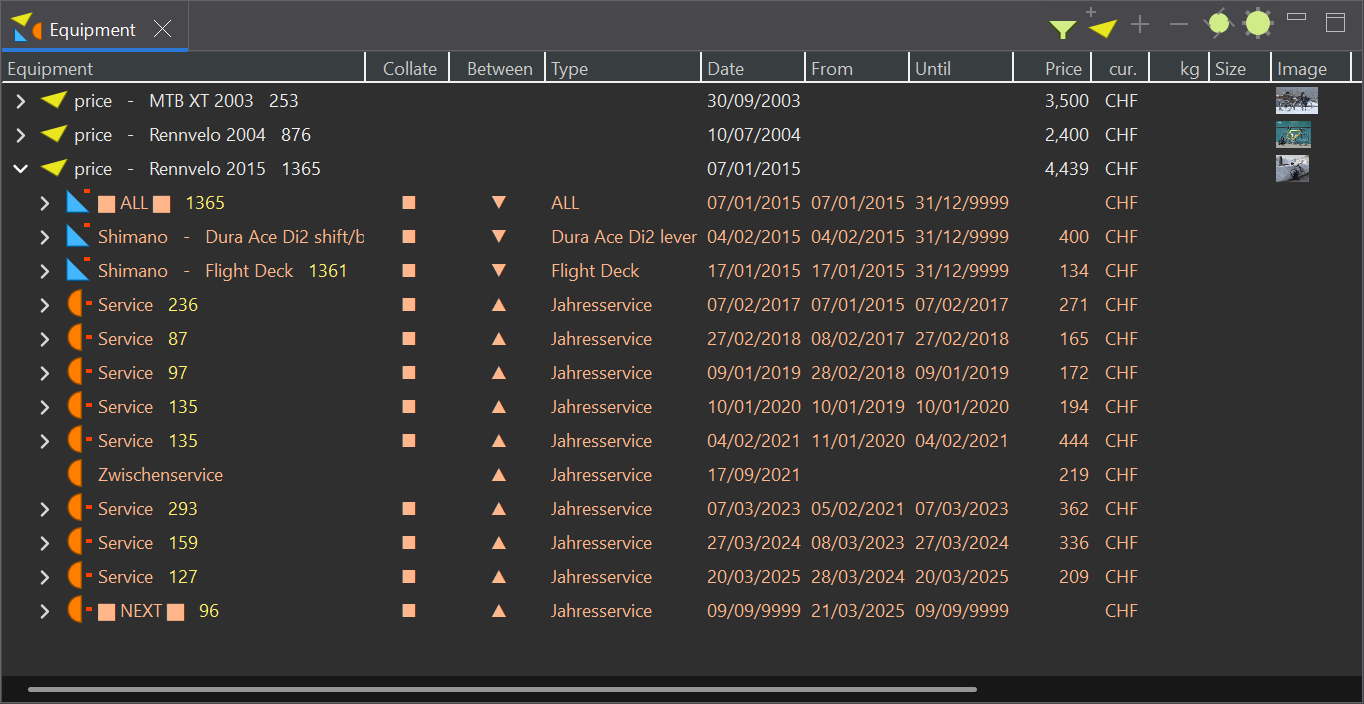

Manage Equipment
The equipment view context menu has all actions to manage equipment assets.

All Dates
These are all date related fields or columns
| Field / Column | Description |
|---|---|
|
Date |
Starts or ends a collation |
|
From |
Is computed and depends on the Previous and Next part/service |
|
Until |
Is computed and depends on the Previous and Next part/service |
|
Duration |
Is computed and depends on
|
|
Built |
Its just for informational purposes |
|
Purchased |
Its just for informational purposes |
|
Retired |
Its just for informational purposes |
This page is updated for version 26.3
